 Jiza
JizaNo connection waits for the last megabyte.
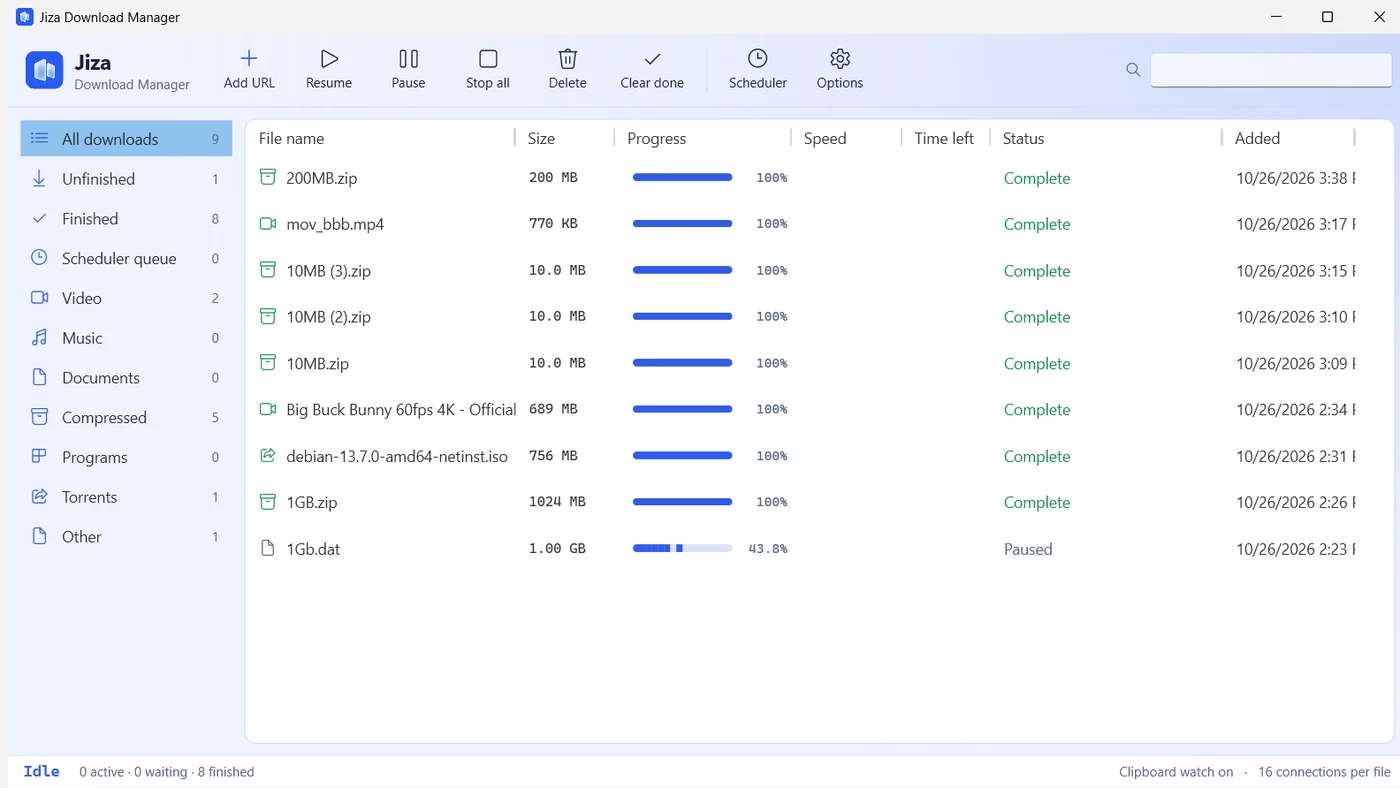
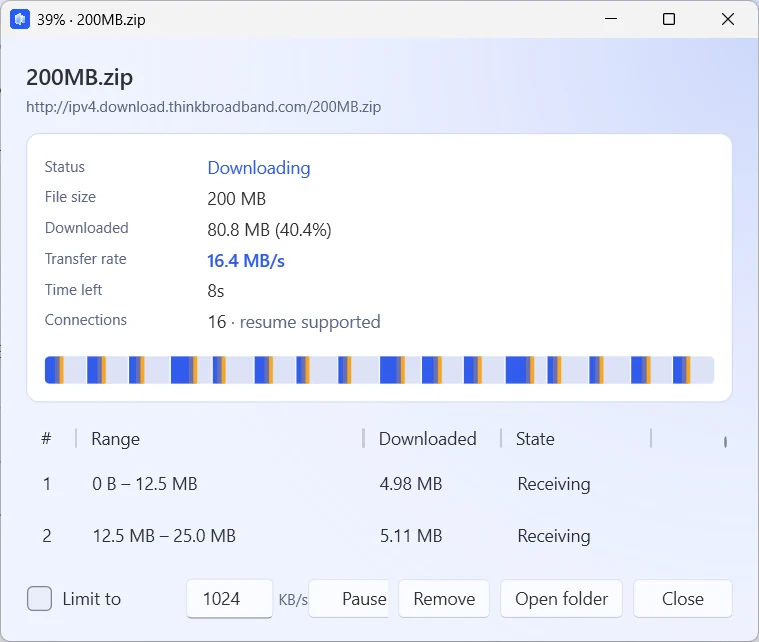
Jiza splits every file into lanes and downloads them over 16 connections at once. When a connection finishes its lane, it takes half of the slowest one, so the end of a download moves as fast as the start.
Everything a download manager should do
Built on the downloader from the Jiza iPhone app, then extended for the desktop.
Faster big files
Each file is split across up to 32 connections. Servers that cap connections per user are handled automatically.
Pick up where you stopped
Pause, close Jiza or restart Windows. Jiza fetches only the parts it doesn't have yet.
Takes over browser downloads
Works with Chrome, Edge and Brave. Your sign-in carries over, so downloads that need a login work too.
Videos from 1,000+ sites
A Download with Jiza button appears over videos. Choose the quality, or keep just the audio.
Magnets and .torrent files
Paste a magnet link or open a .torrent file. Jiza finds peers and checks every piece.
Download overnight
Start the queue at a set time, cap the speed, then let Jiza put the PC to sleep when it's done.
Paste any link
Jiza reads the address and the server's answer, then picks the right way to fetch it. Copy a link anywhere and Jiza offers to download it.
https://cdn.example.com/setup.exe | Files over HTTP and HTTPS, split across many connections. |
ftp://mirror.example.org/pub/disk.iso | FTP and FTPS, with resume. |
https://stream.example.com/live/index.m3u8 | HLS streams: segments fetched in parallel, decrypted and joined into one video. |
https://www.youtube.com/watch?v=… | Video pages, with a choice of quality. |
magnet:?xt=urn:btih:… | Torrents, with DHT and peer exchange. |
Measured, not promised
From the first test session, on a line that tops out near 20 MB/s. A single-connection download on the same line reached 20.7 MB/s; Jiza matched the line.
file                          size      result
1GB.zip (thinkbroadband)      1.00 GB   done in 56 s · peak 24.9 MB/s
                                        started with 16 lanes, split into 35
debian-13.7.0 netinst.iso     756 MB    torrent · SHA-256 matches Debian
Big Buck Bunny 4K (Blender)   689 MB    3840×2160 AV1 + Opus, 10:34
pause → quit → reopen → resume          no byte fetched twice
Install in two minutes
No installer and no account. Settings and history stay on your PC.
-
Download and run JizaDM.exe
Save it anywhere, such as your Desktop, and double-click it. On first start you accept the free license, and Jiza connects itself to your browsers.
-
Open your browser's extensions page
Go to chrome://extensions (Edge: edge://extensions) and turn on Developer mode.
-
Load the Jiza extension
Click Load unpacked and choose this folder:
%AppData%\JizaDM\extension -
Download something
Click any file link. Jiza opens with the name, size and folder filled in. Over a video, use the Download with Jiza button.
Questions
Is Jiza really free?
Yes. You can use it on any number of PCs, at home or at work, at no cost. There are no ads, no trial period and no paid tier. The license covers the details.
Does Jiza collect any data?
No. There are no analytics. Jiza only contacts the sites you download from, the yt-dlp and FFmpeg releases on GitHub when you first use video features, and torrent peers when you download a torrent.
How do I know the file is genuine?
Compare its SHA-256 with the one on this page. In PowerShell, run Get-FileHash JizaDM.exe in the folder you saved it to.
What can't it download?
Streams protected by DRM, such as Netflix, Disney+ and Spotify. Jiza doesn't bypass copy protection. Only download files you have the right to keep.
Does it work with Firefox?
Not yet. The browser extension supports Chrome, Edge, Brave and Vivaldi. In any browser you can still copy a link; Jiza notices it and offers to download.
How do I remove it?
Close Jiza from its tray icon, delete JizaDM.exe, and delete the folder %AppData%\JizaDM. Remove the extension from your browser's extensions page.
Download Jiza Download Manager
Version 1.0.1 · 73.3 MB · Windows 10 and 11, 64-bit
SHA-256 3459fdc84891a7fe545fe31c8426ef9050543963179a5c2973767d6ae3790544